Profit and Loss Statements for Restaurants

How much money are you actually making at your restaurant? That’s exactly what a restaurant profit and loss statement can tell you.

Let’s break it down by one of the most common menu items in the United States: Pizza. Popular restaurant chain Domino’s charges $17.99 for a large (14”) pepperoni pizza in the Boston area. But Domino’s doesn’t make $17.99 on the pizza. Every pie costs money in ingredients (flour, cheese, sauce, spices, pepperoni), labor (the average MA Domino’s employee makes $16/hour), and packaging (pizza box).

What’s left over after all of those costs is the profit on that particular pizza. And that doesn’t even include fixed costs like rent on the kitchen space, utility and heating, appliances, and other overhead.

Answering the question of how much money you’re making as a restaurant owner can get complicated fast. But whether you’re using a team of accountants or managing the books yourself, you’ll need to put together a profit and loss statement (often shortened to the phrase “P&L”) to tell you just that. Here’s everything you need to know about creating and reading one:

What Is a Restaurant Profit and Loss Statement?

A profit and loss statement provides a record of a restaurant’s financial health by outlining revenue, costs, and expenses during a set period of time — usually over a fiscal year, but it can be more frequent depending on your management style or if you’re part of a public company. Another word for a profit and loss statement is an income statement, because it shows your overall restaurant income for the year.

Your profit and loss statement goes into detail for each revenue and expense to determine your net income, or profit. Here’s the basic equation:

  • Profit = (Total Revenue + Gains) – (Total Expenses + Losses)

A good way to remember this is thinking back to the Domino’s example. At the end of a given pizza, how much of that $17.99 does the restaurant actually see? Profit is ultimately what your restaurant “pockets” at the end of the year after paying for restaurant space, food and beverage supplies, employee wages and tips, and other overhead, like linens, decor, or appliances.

Keeping up a regular P&L statement helps you assess your restaurant’s financial health so you know exactly what’s coming in and what’s coming out — so you can make sure your restaurant stays as profitable as possible.

How Often Should You Update Your Restaurant P&L Statement?

A P&L is one of the building blocks of your restaurant accounting and should be updated on a regular basis, though the exact timing is up to you. Because it’s a helpful snapshot of your restaurant’s financial health, many restaurant owners prepare one weekly or monthly. If you have multiple restaurants, you’ll want to create a profit and loss statement for each individual unit as well as your business as a whole.

Monitoring your P&L gives you insight into:

  • Whether or not your restaurant is profitable — which can take time
  • How to prioritize business decisions, like adding new menu items, changing suppliers, or hiring and staffing
  • Where your “money makers” are on your menu
  • Any inconsistencies or losses that don’t make sense, which is a sign of theft
  • At a minimum, it should be prepared each quarter as part of your quarterly taxes.

Many point-of-sale systems automatically generate P&Ls on an ongoing basis so you can see an updated dashboard of your performance.

What is Included in a Profit and Loss Statement?

Restaurant owners create P&L statements in one of two accounting methods: Cash and accrual.

  • The cash method is the simplest accounting method and focuses on money flowing in and money flowing out. Restaurants record transactions for every cover and record liabilities (expenses and losses) whenever bills come due.
  • The accrual method records revenue as it is earned, rather than when cash is received. This method is more common for businesses that provide services or products, such as retail or software, where customers order in advance before receiving payment.

These two methods differ on the specifics included in your profit and loss statement, and how far in the future you record sales and expenses. Which method you choose is up to you (and may be worth chatting with an accountant about.)

In both methods, however, profit and loss statements include each element that makes up profit:

  • Sales and revenues by category: Food, wine, liquor, merchandise, for example
  • Costs of goods sold (COGS) by category: Typically, how much it costs for your ingredients.
  • Labor: Wages, tips, and salaried employees
    Incidental operating expenses: The types of costs that fluctuate, like advertising, miscellaneous repairs, administrative expenses like credit card fees, utilities, live music, and so on
  • Fixed costs: Monthly rent, insurance, and other overhead costs you cannot change or control
  • Depreciation: Over time, your assets, like appliances and restaurant equipment, depreciate in value. Calculate this cost using this formula.

Subtracting the sum of all of your costs (labor, operating expenses, fixed costs) from your sales and revenues will give you net profit.

Note that profit typically is calculated before taxes. Many P&Ls include an “income before taxes” line and then a line to calculate your taxes afterwards.

How to Create a Restaurant P&L Statement

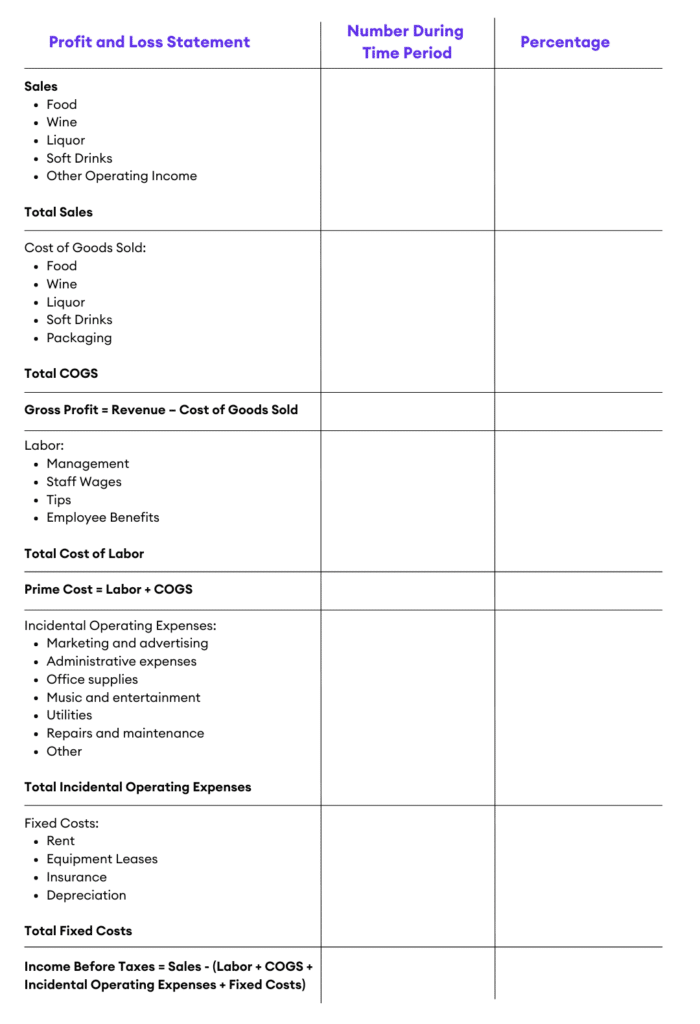
Now, it’s time to put all of those elements together. Here’s an example of what a P&L statement could look like for a restaurant. You’ll want to make sure you include the categories and costs most relevant to you, but you can start with this template.

This example below takes a high-level approach, but it’s worth creating a detailed examination of at least your expenses, if not your revenue by menu item, at least once every quarter.
How to Analyze a Restaurant Profit and Loss Statement

Ok, here’s some bad news: The average profit margin for a restaurant is less than 5%. The restaurant industry has famously paper-thin profit margins, which is exactly why 60% of restaurants fail in the first year.

That’s exactly why creating a profit and loss statement is so helpful. Besides getting your books in order so you can accurately pay your taxes and manage your business, it’s the best way to understand the overall financial health of your restaurant.

Few restaurant owners sign up for this part of the deal. You’re likely passionate about food and creating deep, meaningful experiences for your customers — not crunching numbers. But taking a hard look at your profit and loss statement can help you balance your overall costs and make better business decisions, whether that’s looking at specific ingredients in season, choosing new table linens, or deciding whether or not to hire that extra server.

In addition to pulling together all of your revenue and expenses, your profit and loss statement will include several restaurant calculations to help you better understand your business:

Percentage of sales

The first area of your P&L to examine is your revenue by category (or if you’re getting detailed, your revenue by menu item.) To be able to make better decisions on your offerings and on your marketing and sales, you need to know exactly which categories perform well and which don’t.

For example, your wine list may be a powerhouse, making up the majority of your sales. If that’s the case, then highlighting your wine list in marketing materials, training your staff on your different wine offerings, or streamlining other drink choices that aren’t performing as well can help you optimize your revenue.

Gross profit = Revenue – COGS

Gross profit is the first measure of your business health. This is different from your final profit number at the end of your P&L. What this tells you is specifically how profitable your menu is — how much are you bringing in and how much is coming out based on your specific menu items and the cost of the ingredients to make them.

Knowing this allows you to start to dissect your menu to understand which items are worth keeping and which aren’t helping your restaurant grow. It’s also a good place to look at your suppliers and whether or not they’re contributing positively for your business. This might mean purchasing items in bulk or working with local suppliers that charge less for shipping or delivery.

Prime cost: COGS + Labor

Prime cost usually makes up 60% of your total costs. Calculating prime cost gives you a window into your two biggest expenses that you can (theoretically) control. You won’t necessarily be able to negotiate or change your rent, but you can change suppliers, menu items, and adjust staffing accordingly.

Restaurants typically have two levers to increase their profit: Increasing menu prices or decreasing their prime cost.

Net Profit = (Total Revenue + Gains) – (Total Expenses + Losses)

This is the big one! Your net profit is the overall profit that you’ve earned over the given time period. Ideally, this number is positive — often called being “in the black” — but for many restaurants, it takes years to reach profitability.

To increase your profit margin, you’ll need to look at both sides of the equation, increasing your total revenue and decreasing your total expenses.

What Comes Next? Improve Your Margins!

Of course, figuring out what your restaurant is important — but it’s what you do with that information that really matters. From rethinking your menu strategy to implementing new technology, there are countless ways to uncover new efficiencies and reduce costs, using your P&L as your guide. 

(If you want to learn more about how digitizing tip payouts can save your team time, make them happy — and yes, improve those margins — get a demo here!)


You might also be interested in

2025 was a defining year for Kickfin and the customers who rely on our software to automate their tip management processes

Driven by direct customer feedback and the evolving realities of restaurant operations, our Product Development team delivered a wave of meaningful enhancements across tip calculation, integrations, user controls, and accounting.

Before we look ahead to 2026, here’s a look back at the product advancements that made Kickfin more robust, more flexible, and more ready to meet the demands of restaurant teams than any other tipping solution.

Advanced Tip Calculator Enhancements

n 2025, we significantly expanded the functionality of Kickfin’s Tip Calculator. Here are a few standout features that we released:

Separate Tips and Auto-Gratuities

Kickfin now tracks tips and auto-gratuities separately, allowing operators to report them independently to payroll and manage them differently for tax purposes.

This distinction is especially important in light of the 2025 No Tax on Tips legislation. While tipped employees no longer pay federal income tax on the first $25,000 in tips earned annually, auto-gratuities, service fees, and other compulsory charges remain taxable.

Kickfin ensures those earnings are categorized correctly from the start — reducing downstream payroll and compliance risk.

House Accounts for Service Charges

Not all service charges are distributed 100% to employees — and Kickfin allows you to handle that with “House Accounts.”

Operators can retain a portion of service charges while distributing the remainder to the team. This is particularly valuable for:

  • Special events and private dining
  • Paying out job roles that don’t typically participate in tip pools (e.g., event managers)
  • Maintaining clarity and transparency around service charge allocation

More Flexible Tip Share Logic

No two restaurants share tips the same way — and Kickfin’s calculator now supports even more real-world scenarios.

Operators can configure tip shares:

  • By shift or by check close, ensuring support staff are compensated appropriately even if they didn’t touch a specific check
  • By hours worked or split evenly, a level of flexibility that remains unique to Kickfin
  • With advanced rules for “remaining tips,” allowing operators to define how servers and bartenders split earnings after support positions are paid out.

These enhancements allow Kickfin to support everything from simple pools to highly complex policies.

Check-Level Edits for Greater Accuracy

POS data doesn’t always capture every nuance, so managers may need the ability to make changes.

Kickfin now supports individual check-level edits for:

  • Cash tips
  • Auto-gratuities
  • Check details and splits

This ensures large parties, special events, and edge cases are handled accurately.

Tip Calculator Change Log for Auditability

Any check-level change made by a manager is recorded in a detailed change log. This creates a clear audit trail, helping operators resolve questions quickly and reinforcing transparency and trust with staff.

Enhanced Functionality for Smarter Cash Handling

Thousands of restaurants use Kickfin because they don’t have enough cash on hand to pay out credit card tips, and they want to reduce the amount of cash handling in their restaurant altogether.

However, we know cash will probably always be a (small) part of the equation. Kickfin makes it easy for you to handle that with some added functionality:

  • Tips left in cash: If a diner leaves a pile of cash at your table, it might not get recorded in your POS. However, Kickfin allows you to record it and distribute it through our platform.
  • Cash payouts: Many operators may want to distribute all of the cash left in their register at the end of a business day to avoid bank runs for deposits. Again, that’s easy to do with Kickfin’s “Blended Payouts” feature.

Enhanced Support for Toast Delivery Service Tips

Kickfin now handles Toast Delivery Service tips more intelligently by excluding driver tips from the general tip pool and assigning those tips directly to the delivery driver. This ensures tips are distributed exactly as intended.

Kickfin delivers on all of those fronts by:

  • Freeing managers up from bank runs and the back office, so they can focus on everything that can’t be automated.
  • Ensuring employees walk out the door with their earnings already in their existing bank account, no waiting, no detours.
  • Helping operators stay compliant, track everything, and uncover new efficiencies.

Expanded POS and Payroll Integrations

New POS Integrations

In 2025, we expanded our POS ecosystem with new integrations including Union POS and rPOWER. POS integrations eliminate manual uploads, reduce errors, and enable real-time tip calculation and reconciliation. Learn more about integrating your POS with Kickfin.

New Payroll Integrations

We also launched new payroll integrations with ADP Run, Paylocity, and Restaurant365 Payroll.

Once activated, Kickfin generates export files that sync seamlessly with your payroll system — significantly reducing manual work for payroll teams.

Looking Ahead

platform that keeps pace with the ever-changing complexity of modern hospitality operations.

If you’re not yet using Kickfin, now is the time to see what advanced tip management really looks like 👉 Schedule a demo today!

If you’re already a Kickfin customer, our team is happy to walk you through what’s new. 👉 Schedule a quick consult to learn more.

And of course: Stay tuned for what’s to come in 2026!

Kickfin is proud to announce that we have once again been named to the 2025 Deloitte Technology Fast 500™, a ranking of the fastest-growing technology, media, telecommunications, life sciences, fintech, and energy tech companies in North America, now in its 31st year.

Kickfin is the only company on the list purpose-built for restaurants and bars to automate tip management — marking another major milestone for our team, our partners and the thousands of restaurant operators who trust us to modernize their tip-pooling and payout workflows.

Why it matters

When it comes to tipping out employees, cash is no longer king — and needs are changing fast. Hospitality workers demand (and deserve!) faster, cashless payouts; burned-out managers need more hours in their day; and now more than ever, operators care about visibility, compliance, and employee satisfaction.

Kickfin delivers on all of those fronts by:

  • Freeing managers up from bank runs and the back office, so they can focus on everything that can’t be automated.
  • Ensuring employees walk out the door with their earnings already in their existing bank account, no waiting, no detours.
  • Helping operators stay compliant, track everything, and uncover new efficiencies.

What sets Kickfin apart

There’s a reason Kickfin is the best-in-class tip management solution.

  • Broader POS integrations: We’ve expanded our direct integrations with leading POS brands, including Toast, Square, SkyTab, Genius POS, Union, and more — so managers can pool and pay out tips in a matter of clicks.
  • Enhanced tip-pool logic and flexibility: Our platform automates even the complex tip pool policies, with more tip pooling and automated reconciliation features than any other solution, while keeping the end-user experience simple and intuitive.
  • Instant, cashless payouts: With fewer cash drawer runs and real time bank deposits, teams experience faster shift-close, fewer errors and improved satisfaction.
  • Built-in compliance and reporting: As tip-pooling regulations continue to evolve, Kickfin empowers customers with robust features like digital paper trails and payroll integrations to ensure accuracy and compliance from end to end.
  • Customer success focus: Our fully U.S.-based Customer Success team is partners with customers to make onboarding fast and easy, no matter how tricky your tip policy may be, so you get ROI right away.

A big thank you

We’re honored to be recognized by Deloitte, and even more excited about what comes next. For restaurant operators, managers and employees alike, the future of tip management is here, and we’re thrilled to be your partner.

Ready to see what automated tip pooling and instant payouts look like in action? Book a demo today!

Brand new feature, coming in hot!

As part of our latest product release, Kickfin now offers Blended Payouts for even easier, fully automated tip management and reconciliation.

Why Blended Payouts Matter

Now more than ever, restaurant guests use credit cards or digital payment methods instead of cash. For many operators, that means there isn’t enough cash on hand at the end of a shift to pay out tips. But employees still want to receive their payouts immediately after clock-out. 

As our customers know, Kickfin solves for those cash shortages by automating and digitizing the payout process — giving you the power to send instant, cashless payouts directly to your employees’ bank of choice, 24/7/365. 

The result: minimal cash handling and risk, better accuracy and tracking — and of course, fewer bank runs.

However, digitizing payouts often results in some leftover cash in the drawer. Over time, we’ve heard from customers who prefer to use up that cash to pay out tips, then distribute the remaining tip amounts via Kickfin. 

With Blended Payouts, you can do just that — and still account for every penny paid out, quickly and accurately, within the Kickfin platform. 

How Blended Payouts Work

As always, all Kickfin customers can still choose to split individual payment amounts between instant payouts and payroll. Once you enable the new Cash Payouts feature, you will now be able to account for any cash tip payments that were also distributed.

Note: This feature lives within Kickfin’s Tip Calculator, which means you must have an active POS integration to use it.

  • Once it’s enabled, you’ll see the new “Cash Payouts” button on the Payment Review screen.
  • After clicking the button, users will be able to enter the individual cash amounts that were distributed to employees.
  • Back on the Review screen, you’ll see instant payout, payroll, and cash payment amounts for each employee. All three payment methods will have their own line items and be accounted for under your Payment Details.

Watch here for a full walkthrough of the new feature.

Ready to enable Blended Payouts? 

If you’re a current customer, in touch with our Customer Success team at support@kickfin.com to activate this new feature.

(Not a customer yet? Click here to see Kickfin in action and learn how you can automate tip pooling and payouts!)

Kickfin is excited to share the latest addition to our integration marketplace. Read on for all the details around our partnership with Union POS. (If you’re a current Union POS customer and you’d like to learn more about how Kickfin automates tip pooling and payouts, schedule a live demo here.)

AUSTIN, Texas (August 13, 2025)—Kickfin, the leading tip management software, today announced the launch of its integration with Union, the purpose-built POS and engagement platform powering the nation’s busiest bars, nightclubs and restaurants.

Thousands of operators use Kickfin to eliminate tedious tip calculations and remove cash from the tip distribution process so managers can move faster, track everything, and ensure accuracy and compliance.

Untitled design - 2021-04-29T114014.973

By activating the Kickfin-Union integration, we eliminated clunky spreadsheet formulas and fully automated our tip pooling process. After going live, we reduced our time to close out by an average of 30 minutes after every shift.

The Kickfin-Union integration gives Union’s customers the power to auto-calculate tip pools in a matter of clicks and send payouts directly to employees’ bank of choice—no cash or pay cards required.

“By integrating with Kickfin, we’re giving operators the power to choose best-in-class tools that work seamlessly with their Union POS and data,” said Alex Broeker, the CEO and founder of Union. “This direct integration brings automated tip management to our operators while unlocking new opportunities for operational efficiency, employee satisfaction and simplified compliance.”

KPG Hospitality, which operates experiential bars and unique concepts throughout Texas and Tennessee, was among the first operators to activate the Kickfin-Union POS integration.

“Our venues run at a very fast pace. When you consider the time it takes managers to manually calculate tip amounts every day, after every shift, across every location, it’s a lot of unnecessary admin hours,” said Troy Cramer, the managing partner at KPG. “By activating the Kickfin-Union integration, we eliminated clunky spreadsheet formulas and fully automated our tip pooling process. After going live, we reduced our time to close out by an average of 30 minutes after every shift.”Key Features of the Union + Kickfin Integration:

  • Automated Tip Pool Calculations: Calculate complex tip pools in seconds, saving managers hours of administrative work while ensuring accuracy and transparency.
  • Instant Cashless Payouts: Pay out tips directly to employees’ bank of choice instantly, eliminating the need for cash handling and bank runs.
  • Simplified Compliance: Maintain a digital record of every payout, making tip reporting and tax compliance straightforward.
  • Enhanced Tracking: Easily track tips by pay period with comprehensive reporting capabilities.
  • Streamlined Operations: Implement complex tip policies with just a few clicks through an extremely easy-to-use interface.

“Our integration with Union, a leading POS system built specifically to support the busiest venues in the industry, makes perfect sense,” said Kickfin co-CEO Brian Hassan. “Together, we’re creating a solution that saves time, reduces errors, and delivers a better experience for both operators and their staff.”

Available immediately through both Union and Kickfin, venues can integrate their systems and begin leveraging these capabilities today. To learn how this partnership can transform your tip management operations, schedule a demo at GetUnion.com or kickfin.com/demo.

About Union
Union powers a first-of-its-kind venue operating system purpose-built for the nation’s busiest bars and restaurants. More than a point-of-sale, Union connects 1,500+ establishments with 5M+ consumers and leading brands through real-time consumption data. The platform drives operational efficiency, enables frictionless mobile ordering, and facilitates brand-patron interactions that enhance venue loyalty. With $2B+ in annual transactions, Union creates a virtuous cycle where venues improve customer experiences, brands gain direct consumer engagement, and patrons enjoy personalized rewarding hospitality—transforming high-volume operations into next-gen guest experiences. To learn more about Union, visit http://www.getunion.com

About Kickfin
Kickfin is a leading digital tip management platform that automates tip pool calculations and delivers cashless tip payments directly to employees’ bank accounts. Designed to eliminate the administrative burden of tip management, Kickfin helps restaurants, bars, and hospitality venues save time, reduce errors, and improve employee satisfaction. With features like instant payments, digital record-keeping, and simplified compliance, Kickfin is transforming the way venues handle tip distribution in today’s increasingly cashless economy. 

See Kickfin in action!